How to Create Tags
Tags allow you to label accounts with custom identifiers that reflect important details or unique circumstances. They help you quickly organize, track, and filter accounts based on specific criteria that matter to your business. Tagged accounts can then be easily reviewed using the Tagged Records report. Follow the steps below to create your own custom tags.
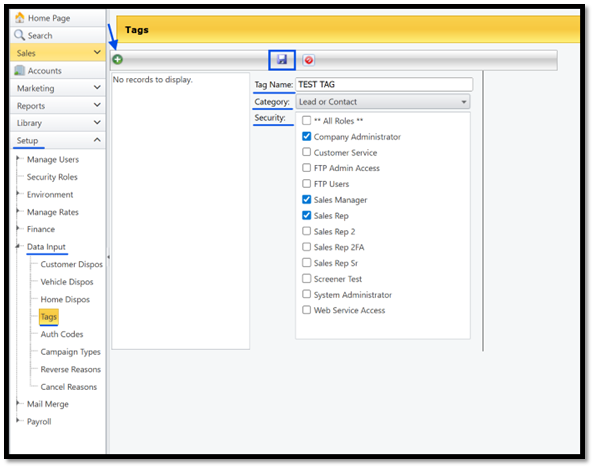
1. Go to the Setup Menu
2. Select Data input
3. Select Tags
4. Click the
 icon to Add New Tag
5. Enter a Tag Name
6. Select Category
7. Select which Security Roles you would like to have access to this tag
8. Click the Save icon
You can also apply tags to multiple records at once. Use this link to learn how to apply tags in bulk;
Was this article helpful?
That’s Great!
Thank you for your feedback
Sorry! We couldn't be helpful
Thank you for your feedback
Feedback sent
We appreciate your effort and will try to fix the article